Operation of the DétruiRAT Maxi-Prises
1. Presentation of the Maxi-Prises model
The trapDétruiRAT® Maxi-Prisesworks completely automatically to capture and eliminate rodents effectively.
When a rat enters the trap, sensors detect its passage and immediately trigger the electrocution system. This is calibrated to be instantaneous, without pain or suffering for the animal. No poison, no chemicals, and no period of agony are necessary.
Once the rodent is neutralised, the trap automatically resets and is immediately ready to capture other pests, without human intervention.
A digital screen and a sound signal inform you of the trap's operation and the number of captures made.
The eliminated rodents fall into a collection tray, which allows for simple, clean and quick disposal (up to several captures in a single night depending on activity).
Depending on the usage environment, a day/night protection mode equips the DétruiRAT range: the trap automatically stops at dawn and restarts at dusk, in order to avoid capturing birds or diurnal animals.
 Collection tray
The collection tray allows you to easily dispose of eliminated rats, without contact.
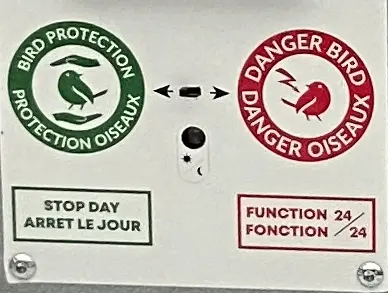
 Protection mode
The Maxi-Prises has a protection mode for birds. The trap will automatically stop at dawn and resume operation at dusk.
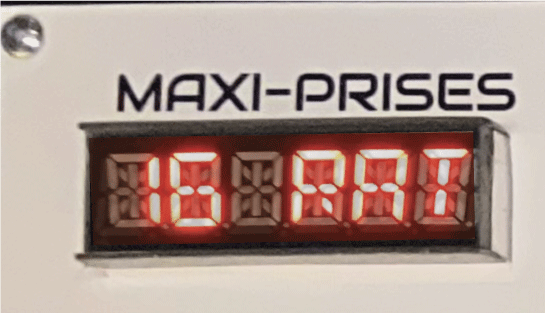
Digital screen
Thanks to this screen, you have easy access to all useful information. It will indicate, among other things, the number of rats trapped and electrocuted for disposal.
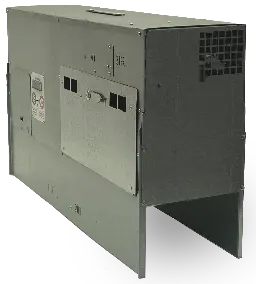 Automatic rat trap
Find the operating manual and other important documents in the "Documents" section.
2. How the DétruiRAT Maxi-Prises trap works
The DétruiRAT® Maxi-Prises trap is a high-performance, automated device designed to eliminate rodents. Equipped with cutting-edge technology and intelligent programming, the Maxi-Prises is designed to trap a rat, quickly eliminate it, reset itself, and then capture other rats (in one night, we managed to capture and eliminate 11 rats). The collection tray makes it easy to dispose of the eliminated rodents.
When activating the trap, be sure to follow the instructions displayed on the screen. After switching it on, never interfere with a trap without reading the information on the screen, as this could interrupt a capture or electrocution cycle.

When a rodent enters the trap tunnel, one of the two infrared barriers activates a centralised gear motor that closes both trap doors in less than 100 milliseconds. Trapped, the rat attempts to escape and heads towards the electrocution cell, where it receives a 6,000 V shock, electrocuting it instantly and painlessly.
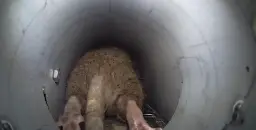
The conduit leading to the electrocution chamber has an internal diameter of 75 mm. Mice, young rats, adult rats and dominant rats can climb up to the electrocution chamber without any difficulty. Intruders (hedgehogs, pigeons, chickens, adult cats or others) that are too large to pass through this 75 mm duct will not be electrocuted and will remain in the trap. They will be released automatically after 3 hours and 30 minutes.
Exercise extreme caution with your pets, such as kittens, chicks, birds and other small animals, as the DétruiRAT® Maxi-Prises trap does not discriminate and will electrocute any animal or bird that reaches the electrocution cell. DétruiRAT® traps cannot differentiate between protected animals and other rodents.
After trapping and electrocuting a pest, the Maxi-Prises automatically reloads after five minutes and has no limit on the number of captures. It will stop trapping once the container is full.
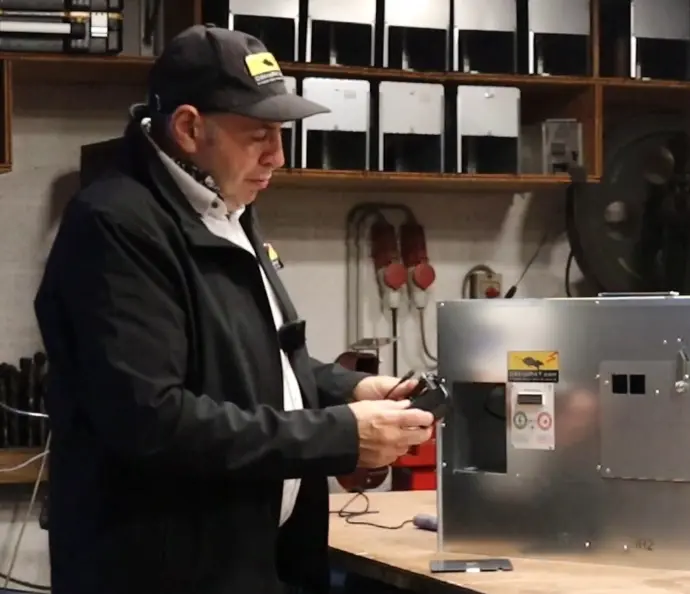
2.1. Starting the DétruiRAT trap
The trap is supplied with a 230 V – 12 V DC adapter. Never use another adapter or an adapter from another type of DétruiRAT® trap, as each type of DétruiRAT® trap has its own type of adapter.
To connect the adapter, link the male cord of the adapter to the female cord of the trap. The adapter is located behind the battery storage door on the left side of the trap. Lift the door to remove it from its housing.
At the battery location, in the rear wall, you will find a hole through which you can pass the cord to the back of the trap. This will prevent cables from lying on the floor or on the front of the trap.
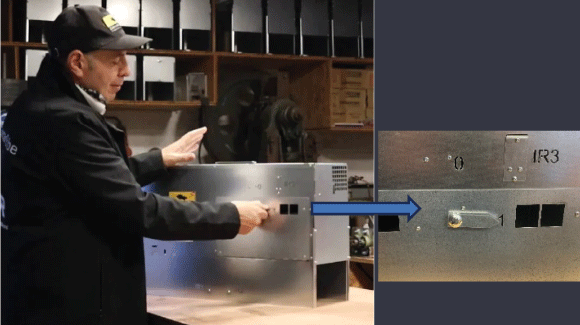
After connecting the trap's power supply, turn the rat box latch to the right, to position 1, keeping a safe distance to avoid injury when opening and closing the doors and moving parts. Be careful, as the trap closes and opens instantly with a loud snap. Sensitive people or animals nearby may be startled.
This action allows the electronics to check that the trap and infrared sensors are working properly. A series of data will be displayed on the screen. Always follow the information when starting up and never interfere with the trap without reading the instructions displayed on the screen.
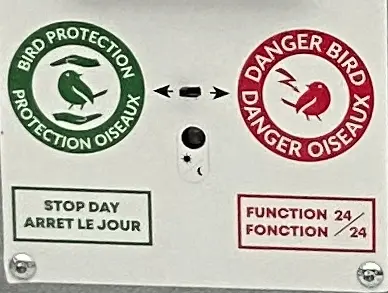
When the Maxi-prises trap is activated, a short beep sounds, followed by a second short beep after closing and opening.
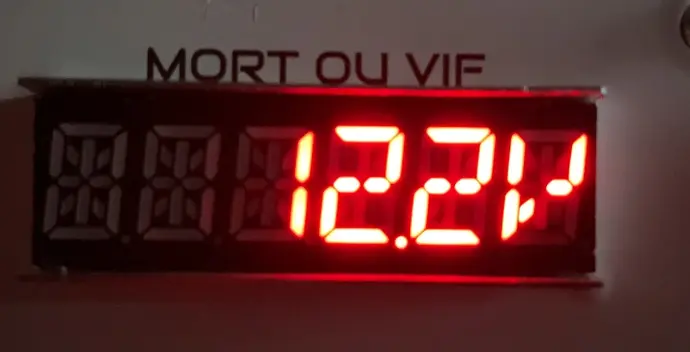
Next, the screen displays the power supply voltage, which varies from 12 to 13.2 V depending on the type of power supply. This means that the trap is working.
If you are concerned about trapping birds, move the slider to the left in 'Bird Protection' mode.
Learn how Bird Protection mode works.
Read the instructions on the screen and listen to the beep.
2.2. What happens when the trap makes a capture?
Once trapped, rats and rodents do not all react in the same way. If the rat does not immediately climb into the electrocution chamber, the trap's programming will kick in after 7 minutes, emitting clicking sounds designed to scare the rat and encourage it to climb in more quickly.Une fois piégés, les rats et rongeurs ne réagissent pas tous de la même manière. Si le rat ne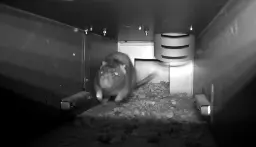 monte pas tout de suite dans la cellule d’électrocution, la programmation du piège interviendra au bout de 7 minutes en émettant des claquements de portes, destinés à effrayer le rat et à l’inciter à monter plus rapidement.
After a capture, if the animal does not climb up within 3 hours and 30 minutes, you may have trapped an intruder. In this case, the screen will indicate this. Please note that animals are automatically released after this period of time. To give them time to escape, the trap will wait 5 minutes before reactivating the two infrared barriers.
If you regularly have intruders, you can set up a trail camera to see what is happening, or you can set up a Vif trap, a Mini Prise trap or a Mort ou Vif trap.
When the trap is new, the first rats caught may not climb up as quickly, as there are no traces of their scent in the pipe leading to the electrocution chamber.
In the morning, if your trap beeps and you find rats in the bin, it is essential to empty it as quickly as possible, as the proliferation of flies can disrupt the operation of the device and cause premature wear of parts.
If there is no risk of trapping birds, you can set the trap to 24-hour mode.
Tips
If you have a large number of flies in your establishment, set the trap to "Bird Protection" mode. This will shut down the trap in the morning and prevent false detections during the day. When the trap is in bird protection mode, it does not operate during the day. If rats come during the day, they will not be trapped, but they will become familiar with the trap and will be more likely to return at night.
If you see rats during the day, especially young rats and larger, older rats, this indicates that they are forced to come out during the day to feed. This situation could mean that you are facing a full-blown infestation. Take immediate action!
3. The digital display and audible beep
3.1. Keep an ear out for the trap's electronics!
The Maxi-Prises trap is an automated machine designed to eliminate rats. It is equipped with cutting-edge technology and programming. When in operation, its screen displays various data every 10 to 20 seconds, such as supply voltage, activation of bird protection mode, number of rodents electrocuted, false detections and number of intruders.
The trap's electronics also signal if an infrared barrier is obstructed or dirty. If there is a problem, the trap may stop automatically. In daylight or if the lighting in a building is switched on, the trap emits a long beep every 10 to 20 seconds to signal a problem.
Two short beeps indicate that one or more rats, mice or other rodents have been electrocuted. When the trap emits a beep, it is recommended that you take action as soon as possible.
After two or three days, if you have not had to intervene on a trap, we recommend that you check the information on the digital screen.
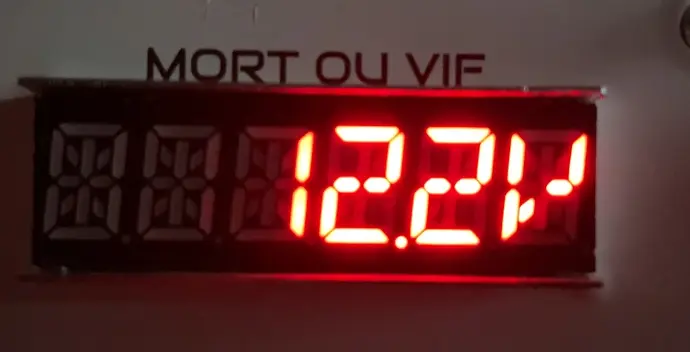
Be sure to follow the instructions displayed on the screen before taking any action. You can remove the dead rodents without disconnecting the trap, but for any technical intervention, it is essential to disconnect all power sources to avoid the risk of electrocution.
The events displayed on the screen will automatically clear when you turn off the trap. When the trap is turned on, for a few milliseconds, the trap will display the number of electrocutions, intruders and false detections since the trap was first turned on.
3.2. When the trap is set
R = Total number of electrocutions
since the trap was first set. This indicates the total number of rodents you could have eliminated. Generally, these are rats and mice.
R | 0 | 0 | 1 | 2 | 5 |
F = Number of false detections
since the trap was first activated. The trap may be triggered by wind blowing straw, feathers, cobwebs, flies, etc. Avoid false detections to prevent premature wear and tear on the trap.
What's more, in the event of a false detection, the trap remains inactive for some time.
F | 0 | 0 | 0 | 0 | 5 |
I = Number of intruders
since the trap was activated. Intruders such as hedgehogs, pigeons, cats (too large to fit into the 75 mm pipe), partially poisoned rats, and old rats unable to reach the electrocution chamber will be released after approximately 3½ hours.
I | 0 | 0 | 0 | 0 | 5 |
During the check (approximately 2 seconds)
The trap emits a short beep, closes, and also checks the three infrared barriers IR1, IR2, and IR3. It then opens, emits a short beep, displays "OK" on the digital screen, and indicates a voltage of +-12.3V every 10 to 20 seconds, which means that the trap is armed and ready to capture. If the trap displays "bird protection", it will be paused and will activate automatically in the dark.
If there is a long repetitive beep, check the message on the screen and disconnect the trap's power supply. 1 long beep = error(s) 2 short beeps = Rat(s), rodent(s) electrocuted. These signals repeat every 10 to 20 seconds.
Problem IR1, IR2, IR3
If one or more infrared barriers are obstructed, the trap emits a long beep and the screen indicates the IR (IR1, IR2 or IR3) causing the problem. Remove whatever is obstructing the IR barrier or clean the IR guards with a soft cloth!
I | R | - | 1, | 2, | 3 |
3.3. When the trap is set
If the trap is mains powered
Powered by a 230V-12Vdc adapter, the screen displays +- 12.3 Volts.
If the trap is battery-powered
12V, the screen displays 12.8V, for example. When the battery discharges, starting at 11.7V, the screen flashes four times every 10 to 20 seconds (you must charge the battery), and at 11.4V, the trap shuts down and emits a long beep until action is taken.
1 | 2. | 0 | V |
Bird protection
If the slider is positioned to the left, after switching on, the trap screen will display 'Bird protection' every 10 to 20 seconds.
When the screen displays bird protection, this means that bird protection mode is activated.
To set the trap to bird protection mode, move the slider to the left. This will prevent birds from being captured during the day. The trap automatically stops operating at dawn or when light is present, and resumes operation in the dark.
When near a light source, the trap may remain in standby mode and never activate because the twilight sensor may think it is daytime.
When the trap is in the dark
After a few moments, it starts up automatically and displays the voltage. If a torch or any other light source is present, the trap may pause again and display "bird protection".
Please note that in 24/7 mode (day and night function), you may trap birds during the day! Be careful and respect nature. Avoid placing the trap where there are birds. If there is a risk, set the trap to "bird protection" mode and do not use bait such as seeds or other items that may attract them!
P | R | O | T | E | C | T | I | O | N | O | I | S | E | A | U |
F= False detections.
1 long beep every 10 to 20 seconds. If the trap makes a capture and there is no movement inside, it will open after 45 minutes. The screen will then display 1 false detection. In principle, the trap could be triggered by wind blowing dust, straw, feathers and spider webs. Spiders, flies or other insects could also cause false detections.
If false detections occur repeatedly, the infrared barriers will automatically pause and reactivate after a few hours. During this time, the trap will not capture any pests. Fix any problems to prevent premature wear and tear on the trap. If the trap refuses to restart, disconnect the power supply for 20 seconds and then reconnect it.
0 | 3 | F | A | U | S | S | E | D | E | T | E | C | T | I | O | N |
I = Number of intruders.
1 long beep every 10 to 20 seconds. If the trap has captured, for example, a hedgehog, pigeon, cat, old rat, poisoned rodent, etc., or any other animal that is too large (75 mm diameter) to climb up to the electrocution cell. They will be released after approximately 3½ hours.
Avoid bait that could attract animals other than rodents!
0 | 1 | i | n | t | r | u | s |
11 RAT= Number of electrocutions
2 long beeps every 10 to 20 seconds.
You should have 11 rodents in the trap tray. It is important that the number of rodents electrocuted matches the number displayed on the screen. If necessary, disconnect the trap, clean the electrodes and check the underside of the electrocution cell (see DétruiRAT trap maintenance).
If there are more rats than shown on the screen, it means that you may have caught several at once. Empty the tray daily to prevent the proliferation of flies or other insects that could cause false detections! Bird protection mode could prevent this type of false detection during the day.
1 | 1 | R | A | T |
Danger capture.
Trap closed: Caution, do not interfere or approach as there may be a rat in the trap. If there is an intruder, after 3.5 hours, the trap may open at any time to release it!
D | A | N | G | E | R | c | a | p | t | u | r | e |
Danger of electrocution
Electrocution in progress. After 5 minutes, the trap automatically reloads and the electrocuted rodent falls into the tray. Before emptying the tray, ensure that there is no movement in the tray.
D | A | N | G | E | R | E | L | E | C | T | R | O | C | U | T | I | O | N |
3.4. The beeper and the twilight sensor
Please note that if you cover the twilight sensor, the bird protection mode will not activate.
The twilight sensor controls operation of the beep signal and bird protection mode. The beep is activated only when there is natural light or any source of light nearby.
How does the beeping sound work and how can it be deactivated? During the day or in the presence of light, the beep attracts your attention so that you can act quickly on the trap. In the dark, the beep is deactivated.
If you don't want to hear the beep, for example to avoid disturbing a small farm or other animal, you can place a black sticker (thick or double) on the face of the twilight sensor, located under the bird protection mode slider. In this way, the twilight sensor will be in the dark and the beeper will not sound.
However, note that if the twilight sensor is hidden with a sticker, bird protection mode will not work, as the twilight sensor will always be shielded from the light.
What's more, by hiding the twilight sensor, you won't be alerted to any problems or captures, which could lead to rats decomposing in the trap. This could lead to false detections, premature wear and tear, and the decomposing rats could damage the trap.
4. Bird protection mode
Please avoid trapping birds during the day!
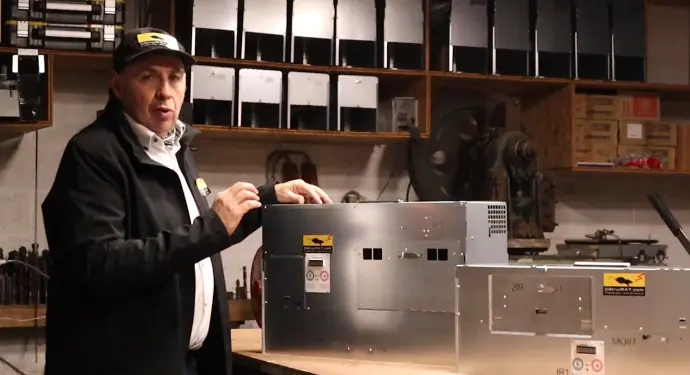
In "Bird Protection" mode, thanks to a twilight sensor, the trap will pause at dawn and automatically restart at dusk, to avoid trapping birds during the day. This mode can also prevent pets from being trapped during the day.
In "Bird Protection" mode, the trap screen displays "Bird Protection" and indicates the supply voltage (+- 12.3 V) every 10 to 20 seconds during the day. At night, the trap operates normally, and the screen displays only the supply voltage.
In 24h/24h mode, the traps operate day and night without interruption and the screens display the voltage +- 12.3 V.
Tip No. 3
If you place a trap in "Bird Protection" mode in the shade and away from daylight, it could be activated during the day.
Tip no. 2
If you set a trap in "Bird Protection" mode and there is lighting in your buildings or public lighting that can illuminate the trap at night, the trap will remain in "Bird Protection" mode and will never be activated.
Once the light is switched off, the trap may take more than five minutes to reactivate the infrared barriers and start trapping again.
Tip no. 1
If the area where you place the trap is infested with flies, we recommend activating the "Bird Protection" mode in warm weather.
This way, the trap will not operate during the day, and you will avoid false detections that could cause premature wear.
The "Bird Protection" mode prevents birds and other animals from being caught during the day, such as cats, hares and hedgehogs. Even if they are trapped, they are too large to pass through the 75 mm pipe leading to the electrocution chamber. However, remain cautious with kittens, chicks and other small pets. Furthermore, do not allow dogs to approach the traps. Sensing the presence of a rat, the dog could attack the trap, injure itself and cause damage to the trap. In our tests, our traps operated mainly in "Bird Protection" mode and at night. Nocturnal birds such as owls and falcons did not seem interested in the food in the traps, but were attracted to the rodents.